

Your brief, your brand, sourced evidence.
The crew is told to invent nothing: a claim it cannot trace to your brief or a source is marked for you to confirm.
You rule.
It runs.
Social Command scouts the openings, learns what you are promoting, builds the material for every channel and publishes it on schedule, once you approve it. Every piece passes your hand before it goes live. You stay in command.
Approve each piece once, on day one. Approved pieces publish automatically across a campaign of up to 365 days. Anything new or changed returns to you before it can go live.
Tell M what you are promoting, to whom, and for how long. The crew does the making. The Scout gathers public evidence — where your audience already is, the hooks and the timing — and every finding carries its source. The Producer writes each post for its channel and its day: the copy, the caption, the call to action, hashtags where they help, and the alt text, built to that channel’s length and format — never one draft pasted six times. The Distributor lays out when each piece goes.
Set your brand kit once — your logo, two typefaces and four colours — and Social Command renders a branded image for each Facebook, Instagram, X and LinkedIn post, on your PC. Add your own photos and clips, and the Producer trims and reframes them to each channel’s format, using the free FFmpeg installed on your PC. New images and video made from a prompt are optional, on your own OpenAI or Gemini API key, entered in the app.
The crew writes for all six channels: Facebook, Instagram, X, LinkedIn, TikTok and YouTube Shorts. TikTok and YouTube Shorts need a video — your own clip, or one made on your key — and on TikTok each post arrives as a draft in your TikTok app for you to finish.
The crew is told to invent nothing: a claim it cannot trace to your brief or a source is marked for you to confirm.
Every piece is checked against its channel’s limits when it is filed, and shown to you exactly as the channel will show it.
Approve the exact words and media, then the time and channel. Approved pieces publish on schedule; any edit needs your approval again.
Facebook, Instagram, X, LinkedIn, TikTok and YouTube Shorts surround the principal. The campaign’s outgoing pieces sit around the channels they belong to.
Social Command keeps the destinations, material and campaign state together. Your AI crew prepares for each channel; you approve the exact pieces. The agent can then auto-publish approved material to its assigned channel on schedule. All six channels are supported. Each platform sets its own review rules, and some hold posts back until you pass them: YouTube publishing stays locked until Google approves your API project, and TikTok posts stay private or arrive as drafts you finish in the TikTok app without its audit.
The smaller markers keep the campaign’s outgoing pieces visible around their destination—what is still to go, or what has gone, by day, week or month.
Automatic release carries out an existing approval. It is not permission to publish new or changed material.
The Theater brings the principal, channels, assets and AI crew into one operating view. Follow the campaign from evidence to draft, approval, scheduled action and receipt.
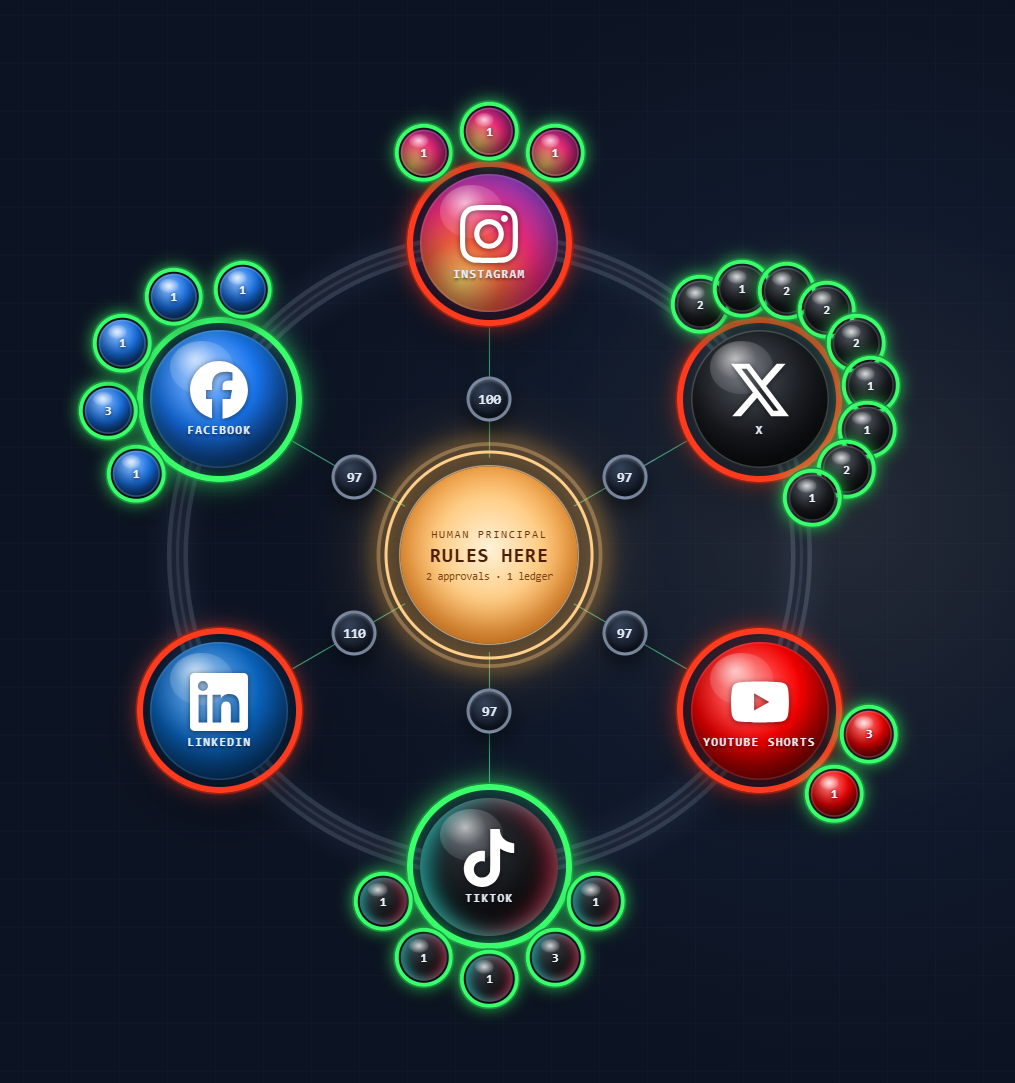
Channels hexagon · app captureEnlarge ↗
Built on CHORIX’s human-governance IP, Social Command puts your judgment ahead of consequential AI action. M brings the proposal, its context and its scope to you before the governed step proceeds.
Five verbs do more than record an opinion: they decide whether the work proceeds, changes direction or stops. The record begins with the proposal—not with an after-the-fact receipt.
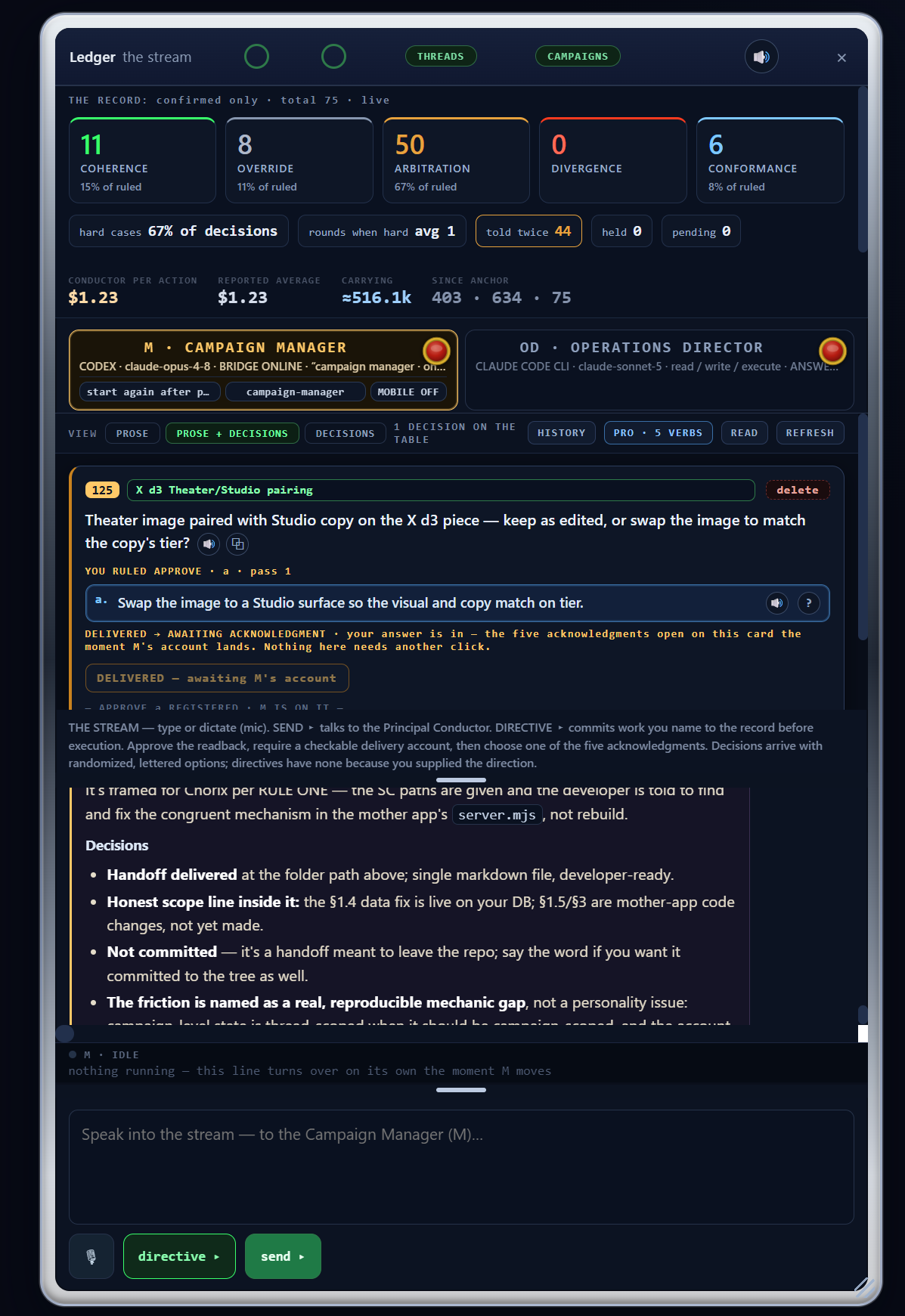
Judgment Ledger · app captureEnlarge ↗
Review the item and the proposed direction together.
The selected verb governs the held proposal. It is not blanket permission for future material.
The decision, returned proof and acknowledgment belong to the same working record. You close each delivered decision with one of five acknowledgments, so the record says how it ended—not just that it did.
Two lead positions. Three specialist hands. The Operations Director and Campaign Manager occupy the top of the pentagon; Scout, Producer and Distributor carry the work below. You remain the authority.
Runs the operation, not the campaign. It can own the Ledger—posing the decisions and writing the account—gives you a direct line for the app, workflow and tooling, and brings you revisions and flags.
Conducts the campaign. Coordinates the AI crew, advances the work and brings consequential decisions forward for your ruling.
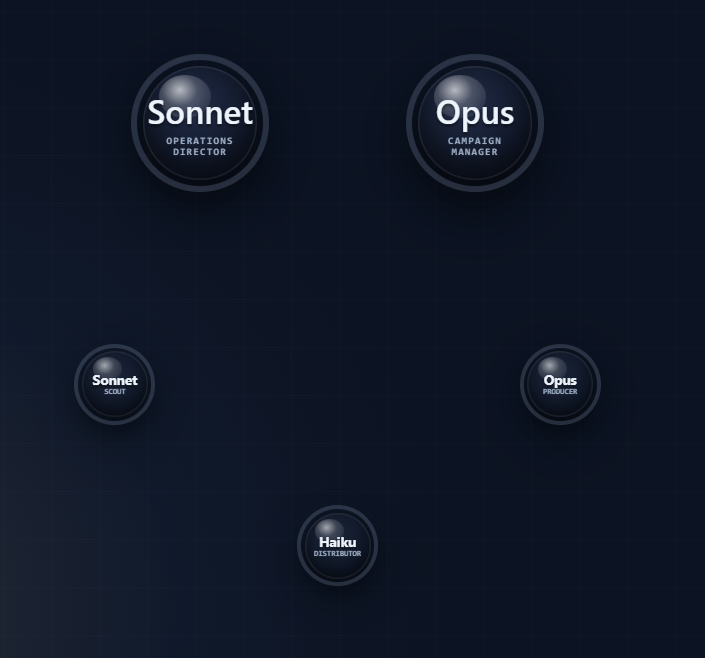
AI crew pentagon · app captureEnlarge ↗
Finds openings, audiences, angles and acquisition opportunities. Surfaces what deserves the campaign’s attention next. Each finding comes with its source, for you to keep—with a one-line reason—or pass.
Builds the copy, concepts, variations and channel-ready assets that you will review and approve. Trims, stills and reframes your media to each channel’s format on your own PC, using FFmpeg, which you install; without it, the Producer writes a brief for each image or clip instead. It checks every piece against its channel’s limits the moment it is filed. Image and video generation is optional, on your own OpenAI or Gemini key.
Plans channel, timing, cadence and release—never around your approval.
Scout discovers. Producer builds. Distributor plans the release. M coordinates the sequence; the Operations Director keeps the run organized. The hands never put questions to you—anything they need decided goes to M, and M brings it to you. You decide what can move forward without manually assigning every small step.
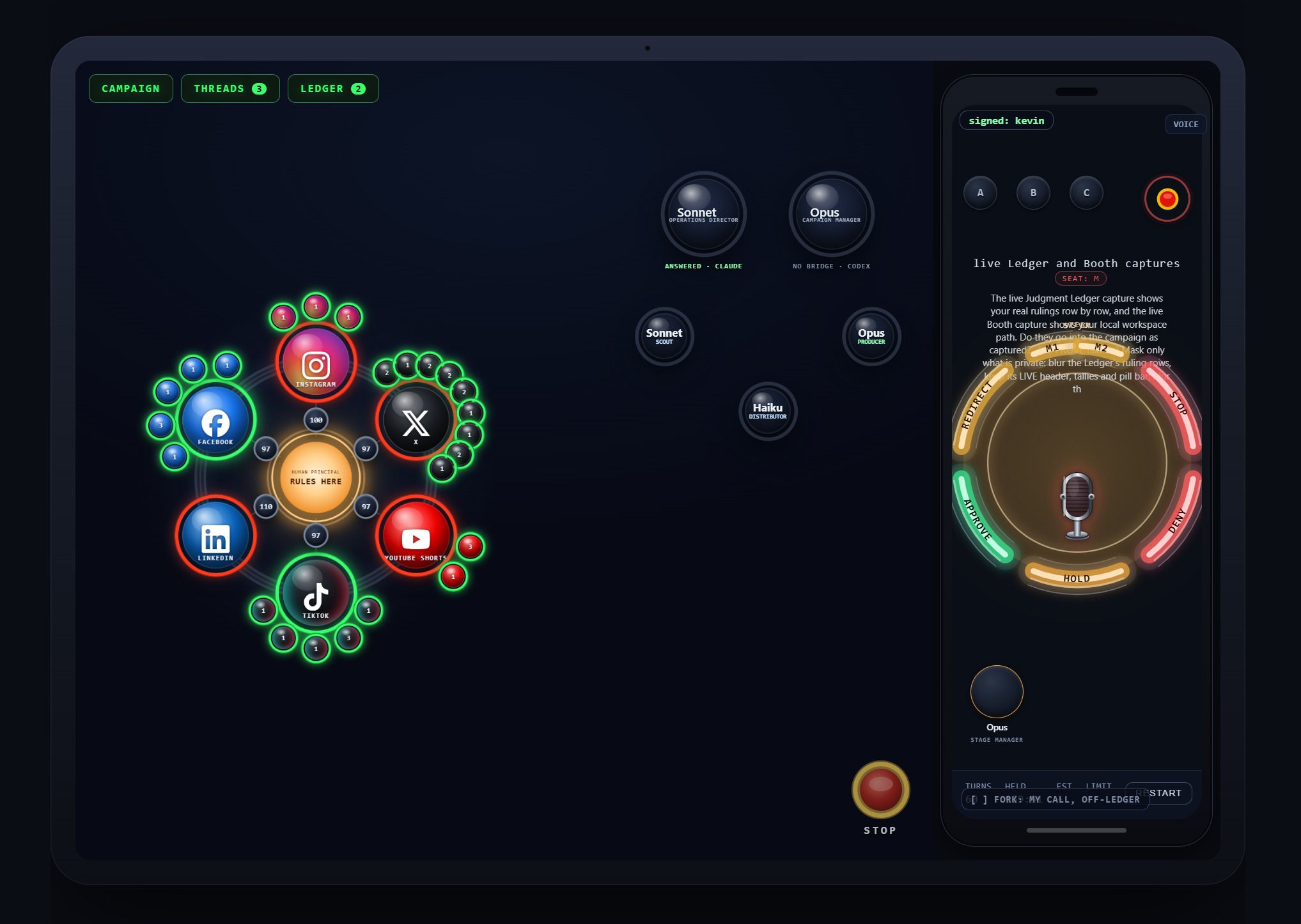
The Booth is the tablet-scale workspace for your AI campaign crew. Keep your direct line to M, the channel field, task rail, workboard and current run close without staying in front of the full Theater.
Draft, break work into tasks and delegate in context. The Booth carries the working surface; the Ledger keeps the decision record; Podium carries portable approval. Your authority stays with the campaign wherever you work.
Keep direction and discussion attached to the work already in progress.
Move between the task rail, current work and crew coordination on a portable surface. From the tablet you can direct M, check or edit a piece, sweep the Ledger and stop the run; casting, keys and settings stay on the desk.
Carry the gate without carrying the whole desk. Podium puts the consequential controls on the phone, with the context you need to make the call.
Approve, deny, steer, hold or stop when the campaign needs your attention. Redirect sends the decision to a second principal when your escalation chain is on.
The phone is an approval surface—not a mandatory checkpoint for every post you have already approved.
Approve the material in advance. Let the scheduled campaign continue without coming back for the same ruling at every release.
With your Pushover key, your phone hears when the crew stages a batch, asks for a grant, when M replies or fails, when a seat is cut off, and when the run stops.
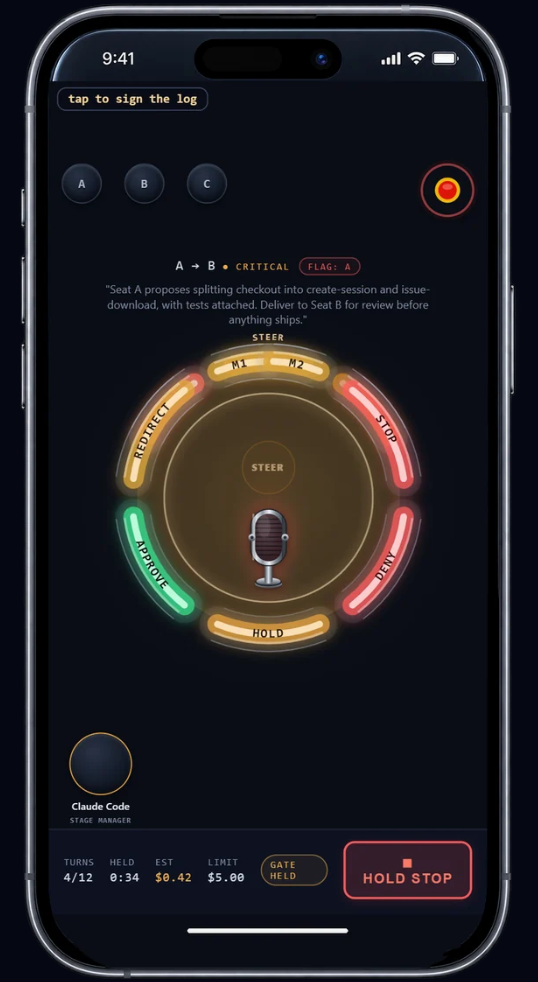
Mobile Podium · app captureEnlarge ↗
A 365-day campaign does not need 365 days of repeat approvals. Review every individual piece on day one, and the agent can publish those approved pieces automatically throughout the campaign for up to 365 days.
The agent can publish. It cannot approve its own material. New or changed material needs your approval before it can go live.
Scout finds the opportunity. Producer builds. Distributor plans the release.
Review the actual material before it is authorized to go live.
Approved pieces go out on schedule without the same approval being requested again.
Keep the material, decision, release state and returned receipt together. Every send attempt leaves a receipt—the platform’s post ID, the authorization it went out under, and the attempt before it—and receipts cannot be edited or deleted.
The Calendar shows what publishes where, on which day—by day, week or month, for one campaign or all of them. M places every asset; you only ever click approval.
Approving here approves the time and channel. The material was already approved in the Theater and is not approved again.
Green is approved for publish. Amber is staged and waiting on your approval of the time and channel. Red needs attention—altered after your approval, or blocked. Blue is delivered and verified published.
An authorized piece goes out at its time without another press. Approve and send a single day, or everything in view, in one press.
A reply that came back never needs approval—only your eye.
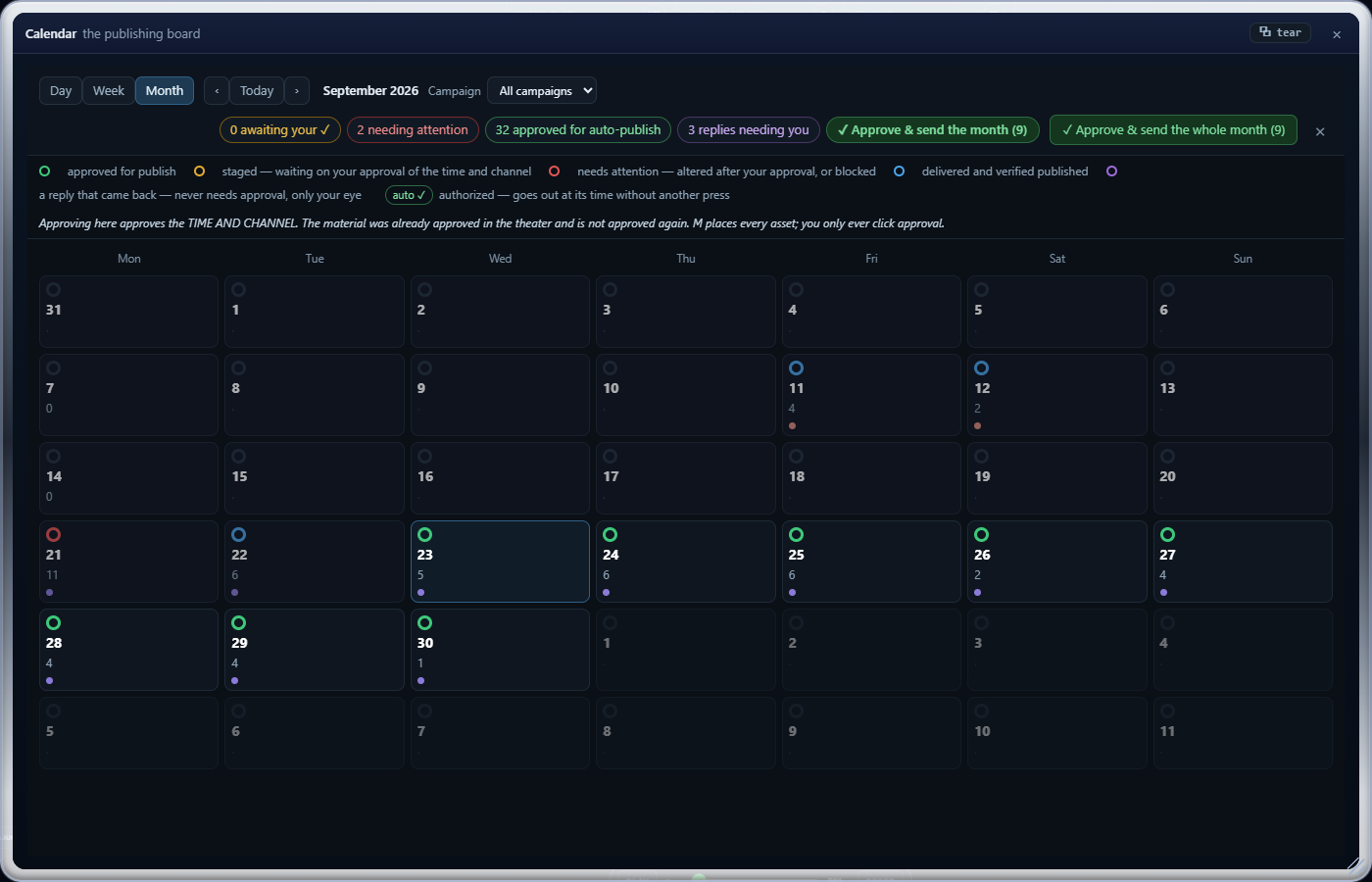
Publishing calendar · app captureEnlarge ↗
Run your AI crew on your existing Claude or Codex subscription through the supported provider tools, or on your own API key, as Chorix does. File a key on a seat’s door and that seat runs on it, or add a provider connection with your key, test it, and cast a seat straight onto it. Gemini runs on your own paid Gemini API key.
Use your eligible Claude subscription through your own signed-in Claude Code installation, or file an Anthropic developer API key. The door shows where to get a key, and that a key bills API usage, not your Claude subscription.
Use Codex with your supported ChatGPT subscription sign-in, or file an OpenAI developer API key. The door shows where to get a key, and that a key bills API usage, not your ChatGPT plan.
Paste a paid Gemini API key from Google AI Studio. Google retired Gemini CLI sign-in for personal accounts on 2026-06-18, so this door has no sign-in: it opens on a key.
The connection supplies the intelligence; it does not change the approval rules. You still approve every individual piece before the agent can publish it. You also pick the model for each seat, and how much it can touch on your PC: read-only, read-write or full access.
At the full tier, which is the default, the AI agents in this app can run any command on this PC as you, and content they read from the web, RSS feeds or Gmail can carry hidden instructions (prompt injection) that reach that command line. You can cast a seat at a lower tier instead. The full terms are in the licence agreement.
Social Command does not bundle or resell model access. AI-provider subscriptions and API usage are separate from Social Command. API billing is separate from subscription allowances. Provider eligibility, model availability, usage limits and terms apply.
Governance is included. Every time. No compliance tier. The complete authority model is the foundation of Social Command, not an upgrade.
Intentionally not offered for sale. The commerce system behind this product is built and proven.
For new subscriptions from February 1, 2027. The rate changes, not the product.
Billed monthly. Cancel any time; cancelling stops the next renewal. If a payment is not received, work and publishing pause after a 14-day grace until it is; your records stay readable and exportable.
One principal on one PC. Each subscription licenses one principal, the named Authorized User, to use the Licensed Software on one PC. This is a term of this Agreement and a limit on permitted use. It is not a technical control: the License File carries no device binding, and the Licensed Software does not claim to enforce this limit. Use beyond it is a breach of this Agreement.
Social Command does not bundle or resell model access. AI-provider subscriptions and API usage are separate from Social Command.
Yes. You approve every individual piece before it publishes. Once approved, the agent can publish that material automatically at its scheduled time. It cannot approve new material on your behalf.
Yes. Approve all the individual pieces at the start, and those unchanged, approved pieces can publish on schedule throughout the campaign for up to 365 days without repeating the same approval at each release.
Your release is fingerprinted against the exact copy, media, settings, channel and day. Change any of it and the old approval no longer matches, so the revised piece cannot publish until you approve it again.
All six are supported: Facebook, Instagram, X, LinkedIn, TikTok and YouTube Shorts, each with its outgoing pieces in the channels hexagon. This app posts through each platform's official developer interface, so you create a developer app on every channel you want, in your own account. Each platform sets its own review rules, and some hold posts back until you pass them: YouTube publishing stays locked until Google approves your API project, and TikTok posts stay private or arrive as drafts you finish in the TikTok app without its audit. Meta may require App Review and business verification, and needs a public privacy-policy address. Review times and any fees are set by the platforms, not by us, and we have not confirmed them for every channel.
No. Tell M what you are promoting, to whom and for how long, and the crew writes every post for each channel and day, with a branded image for each Facebook, Instagram, X and LinkedIn post from your brand kit. Add your own photos and clips and the Producer cuts them to each channel's format, using FFmpeg on your PC; new images and video from a prompt are optional, on your own OpenAI or Gemini API key, entered in the app. You still approve every piece before it can publish.
Yes, through the supported provider tools. Claude uses your eligible subscription through Claude Code; Codex uses your supported ChatGPT sign-in. You can also run a seat on your own Anthropic or OpenAI developer API key. Subscription access and API billing are separate, and the provider's usage limits and terms still apply.
No. The Gemini door opens only on a key: paste your own paid Gemini API key from Google AI Studio. Google retired Gemini CLI sign-in for personal accounts on 2026-06-18, so a Google account or subscription cannot open it.
Yes. The Gemini door asks for a paid Gemini API key and says so on the door: a free Google account will not sign in. Google's quotas, model availability and data-use terms apply.
After two failures in a row, Social Command puts that channel on hold and alerts you. It resumes only when you press Resume.
Yes. Each campaign keeps its own threads, assets and schedule. The Theater shows the campaign you have open; the Calendar shows one campaign or all of them.
Social Command pulls daily account metrics from each connected channel. When you switch it on, it also reads the comments and replies on your own posts on Facebook, Instagram, X and YouTube. It never replies on its own.
Yes. One emergency stop halts every seat at once—from the desk, the Booth or the phone—and each seat can also be stopped on its own.
On your PC, under %LOCALAPPDATA%\ChorixSocialCommand, so replacing or deleting the app folder does not touch it. The database, media and channel sign-ins stay there, with the sign-ins encrypted. There is no Chorix cloud and no telemetry. The app contacts SPEKTX's site for one thing only: renewing your subscription licence. It sends only the signed licence file, never your project content. [BUILT; ADDRESS SET; NOT YET TESTED AGAINST THE LIVE SITE]
Each channel has a step-by-step connection card that shows your next step and links straight to the right page on the platform’s own site.
Yes. Export any campaign as a signed record, with a PDF copy and a verifier that checks it offline, without the app.
Social Command runs on Windows x64 and carries its own runtime and everything it needs to run, so nothing is downloaded on first launch. Extract the whole folder and double-click START-SOCIAL-COMMAND.cmd. To run a seat on your subscription, install the Claude or Codex command line and sign in. FFmpeg is optional: install it (for example with winget install Gyan.FFmpeg) only if you want the Producer to trim and reframe your own photos and clips for each channel. Without it, the Producer writes a brief for each image or clip instead.
It may. The download is not yet code-signed, so Windows SmartScreen may warn on first run. Click More info, then Run anyway.
Double-click STOP-SOCIAL-COMMAND.cmd, or close the window. Either one stops the database, the app and every helper cleanly. STOP uses the bundled runtime too, so it does not need Node installed on your PC.
Very little. The database refuses to start on any address but this PC’s own loopback. Your local network reaches the Podium and nothing more of the desk. A public tunnel reaches only the platform webhooks, the sign-in callbacks, signed media links and TikTok’s verify file; everything else answers not found. The desk’s API takes same-origin requests only, its session cookie is strict, and it cannot be framed. The start-up lines never print your Podium access token.
Yes. The included export tool seals the database, your keys and your media into one passphrase-sealed backup file; logs and per-run tokens are left out. The import tool restores it into an empty install and refuses a wrong passphrase. Before a new version changes your database, Social Command copies it to a snapshot first, and it will not open data written by a newer version.
No. The crew’s charters are generic, and no one else’s name or rulings ride in any prompt. Your own profile starts empty and fills from your own install: the name you give at setup and the rulings you write on the Ledger in your own words.
Any time, online through the subscription-management link on your download or success page, or by writing to admin@chorixstudiosc.com. Cancelling stops the next renewal; your licence runs to the end of the period you already paid for.
You can cancel any time; a period already begun is not refunded, except where the law requires otherwise. If a renewal is charged after you cancelled in time, we refund it in full within 10 business days after we learn of it. Only a full refund of a payment ends the licence — a partial refund does not.
Yes. Your licence is for one PC at a time. Export your data with a passphrase on the old PC, then import it on the new one before you start using Social Command there — this brings your database, media and licence file with it. Or start fresh: download a fresh licence file from your account page and adopt it on the new PC's licence screen.
Download a fresh one from your account page and use 'Adopt a licence file' on the licence screen. If it's still refused, write to admin@chorixstudiosc.com with the exact message shown.
Yes — you send your TikTok app to TikTok for approval as part of connecting the channel. Even once approved, individual posts still arrive as drafts you finish in the TikTok app, since that is a separate audit.
An AI campaign crew that carries the work. A human principal who keeps the final word.
Intentionally not offered for sale. The commerce system behind this product is built and proven.
Chorix Social Command comes from SPEKTX LLC, the maker of Chorix. Chorix is human-in-the-loop multi-AI orchestration software for Windows — use Claude, ChatGPT and Gemini together in one app. It seats models from different vendors in a single run, lets them hand work to each other and disagree on the record, and nothing is written or run on the strength of an AI’s own confidence.